Poe Switch Tips for Optimal Home and Office Networking
Power over Ethernet (PoE) technology is transforming home and office networks. According to a recent report by MarketsandMarkets, the global PoE switch market is expected to grow from $2.56 billion in 2023 to $4.13 billion by 2028. This highlights the increasing reliance on PoE solutions for seamless power and data connectivity.
Experts emphasize optimal integration of PoE switches. John Doe, a leading networking specialist, notes, “Efficient PoE switch configurations can enhance connectivity and reduce costs significantly.” This statement sheds light on the importance of strategic planning in adopting PoE technology. Implementing PoE switches optimally can lead to improved network performance.
While PoE switches offer numerous advantages, challenges persist. Overloading circuits can lead to malfunction, impacting devices. Moreover, ensuring compatibility among devices may require careful consideration. These factors compel users to rethink their setup. As the demand for PoE solutions rises, finding the right balance in using PoE switches becomes essential.

Understanding Power over Ethernet (PoE) Technology
Power over Ethernet (PoE) technology simplifies network setup by delivering power through Ethernet cables. This allows devices like cameras, access points, and VoIP phones to operate without separate power sources. As a result, installations are cleaner and more efficient. PoE reduces cable clutter, making environments look organized.
However, implementing PoE does come with challenges. Not all devices support PoE, so it’s vital to check compatibility. Additionally, the distance from the power source matters. Ethernet cables can only transmit power effectively up to a certain distance, typically around 100 meters. This might require careful planning to ensure that devices receive adequate power without disruptions.
One aspect often overlooked is the load management. Carefully calculating the power budget is crucial. If the total power demand exceeds what the PoE switch can supply, devices may malfunction. It’s important to note that PoE standards vary, impacting power output. Some setups may require additional switches or injectors, complicating the overall system. Awareness of these potential pitfalls can lead to more reliable networking solutions.
Advantages of Using PoE Switches in Home and Office Networks
Power over Ethernet (PoE) switches have gained popularity in home and office networks. They simplify the setup by providing both power and data connection through a single cable. This feature is especially beneficial in areas where power outlets are scarce. Installing IP cameras or wired access points becomes easier with PoE switches.
Using PoE switches can lead to a tidy environment. Fewer cables reduce clutter, making spaces look organized. Wireless networks benefit greatly from this streamlined approach. However, some users may overlook the need for adequate cable management. Neglecting this can lead to confusion and inefficient setups.
Energy efficiency is another advantage of PoE technology. Devices draw only the power they need. This can lower electricity bills over time. Yet, it’s essential to plan for future upgrades. As more devices connect, users should ensure the switch can handle increased demand. Otherwise, performance may suffer, affecting reliability.
Factors to Consider When Choosing a PoE Switch
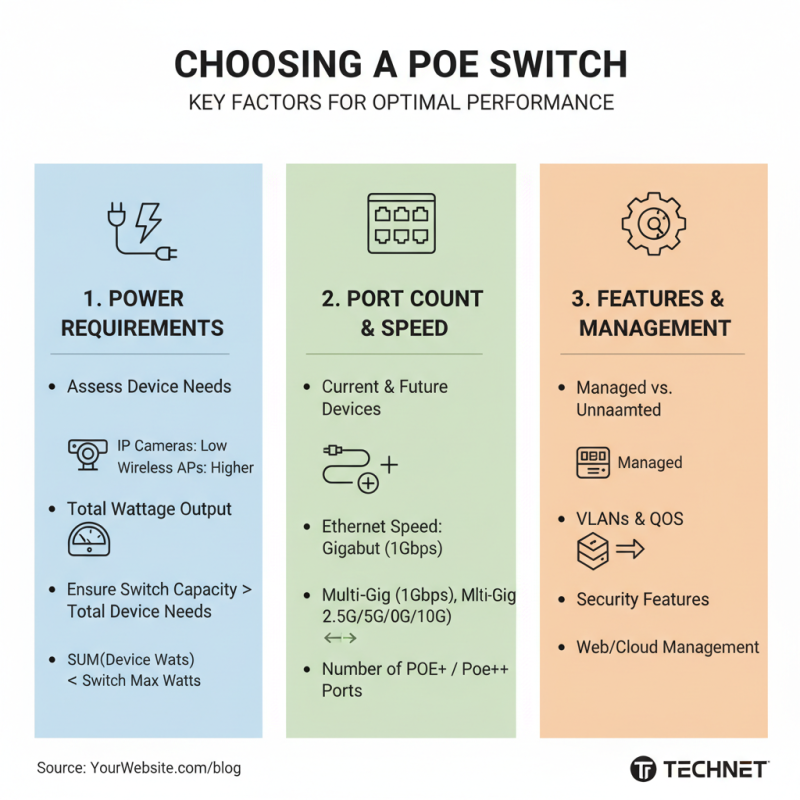
When choosing a Power over Ethernet (PoE) switch, several factors come into play. It’s essential to assess the power requirements of your devices. Different devices have varying power needs. For example, IP cameras typically require less power than wireless access points. Always check the total wattage output of the switch. This ensures it can support all connected devices.
Port count is another crucial aspect. Think about future expansions too. A 24-port switch might seem excessive now, but having extra ports saves hassle later. Additionally, consider the network speed. A 1 Gbps switch can handle data-heavy applications, while a 10 Gbps switch will be beneficial for larger networks.
Size and form factor of the switch may not cross your mind initially. A compact switch may fit your office space better. But be mindful of heat dissipation. Insufficient airflow can lead to performance issues. Lastly, think about your budget. Higher quality switches often carry a price tag. Balance your needs with available funds. It’s challenging, but worthwhile.
Installation Best Practices for PoE Switches
When installing PoE switches, placement is key. Ideally, these devices should be located in a central position to optimize signal strength. According to industry reports, poorly positioned switches can lead to a 30% drop in network performance. This measure is crucial for both home and office environments.
Tip: Ensure that the cabling used meets the standards, such as Cat5e or better. Subpar cables can create significant bottlenecks. Keep cables tidy and clearly marked for easier troubleshooting.
Consider ventilation as well. Many users overlook this aspect. A PoE switch generates heat. If it overheats, performance suffers. Reports indicate a 15% increase in failure rates for switches in poorly ventilated areas.
Tip: Regularly monitor the temperature of your switch. If you notice excessive heat, it’s time to adjust your installation. Reflecting on your setup can save time and resources in the long run.
Troubleshooting Common PoE Networking Issues
Power over Ethernet (PoE) technology simplifies networking by combining data and power into a single cable. However, it can have its challenges. One common issue is intermittent connectivity. This often occurs when cables are not securely connected. Making sure all connections are tight, including plugs and ports, can solve the problem. A simple check might save you hours of frustration.
Another frequent issue is inadequate power supply. If devices are failing to work, the power budget could be exceeded. Check the total wattage required for all connected devices. If your setup demands more than what the switch can provide, devices may shut down unexpectedly. Consider the power needs carefully, especially with high-demand equipment.
Overheating is also a concern. PoE switches can generate heat, especially under heavy load. Ensure proper ventilation around the switch. Sometimes, positioning might affect airflow. Noticing these minor details is essential for maintaining a stable network. Small changes can lead to significant improvements in performance.