Choosing the right PoE equipment is rarely just a matter of counting ports. Global buyers must examine power budgets, network standards, regional certifications, and long-term service support. This guide reviews 10 Best Bypass PoE Switches for Global Buyers, focusing on practical performance rather than impressive specifications alone. A Bypass Poe Switch can help maintain network or power continuity when a connected device, link, or switch function encounters a failure. However, “bypass” is not defined identically by every manufacturer. Buyers should verify the exact failover path, switching behavior, and recovery time before placing an order.
Important details often appear in small print. Check IEEE 802.3af, 802.3at, or 802.3bt compatibility, total PoE output, surge protection, operating temperature, and mounting options. A switch rated for 120 watts may not deliver that power across all ports simultaneously. Cable length and heat inside a crowded cabinet also matter. Look closely. Independent testing, clear warranty terms, firmware updates, and responsive technical support provide stronger evidence than marketing language. Regional voltage input, plug design, customs requirements, and safety approvals can affect the final cost. These points are easy to overlook.
No shortlist is perfect. A model that performs well in a warehouse may be unsuitable for a roadside cabinet or office network. Some products also lack detailed bypass testing data, which should encourage careful questions to suppliers. The following comparison balances documented specifications, operating conditions, buyer feedback, and installation practicality. It aims to support a safer, more informed purchase, while recognizing that local network design and professional verification remain essential.
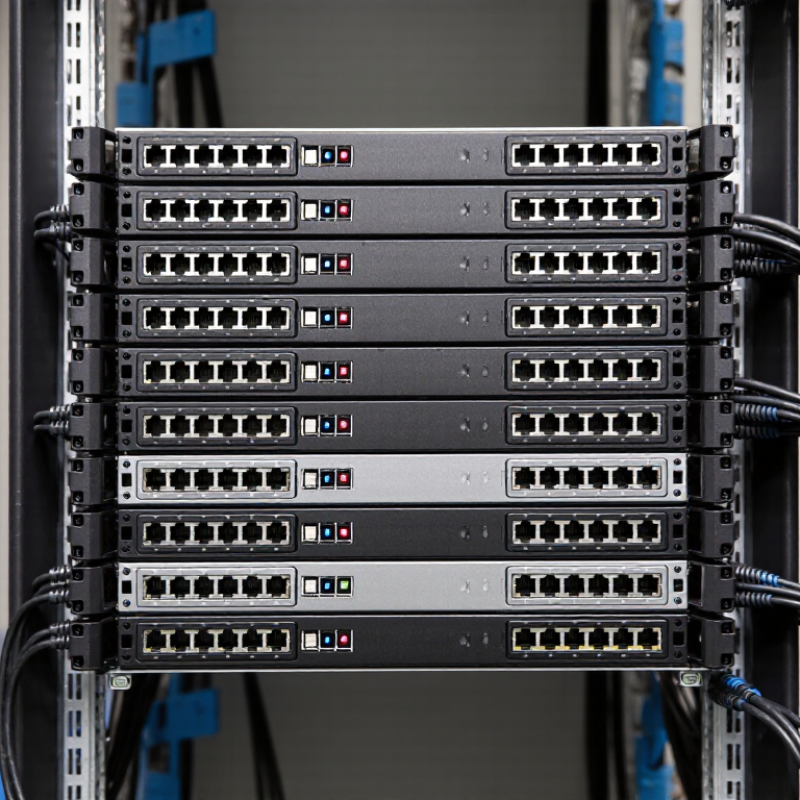
A bypass PoE switch combines normal switching with a hardware pass-through path. When power and management work normally, Ethernet traffic crosses the switch as usual. If the switch loses power, the bypass relay connects selected ports directly. A powered camera, access point, or sensor can then remain online through an upstream connection.
The term is not perfectly standardized. Some suppliers call this function “fail-open,” while others reserve “bypass” for paired uplink ports. Check the wiring diagram, relay behavior, and recovery time before buying.
A field test matters more than a promising label. Disconnect the switch power, watch the endpoint, and measure packet loss.
Power limits also require careful reading. IEEE 802.3bt supports up to 90 watts from the power-sourcing equipment, while the powered device may receive about 71.3 watts under Type 4 conditions. Cable length, temperature, and connector quality reduce practical capacity. According to Grand View Research, the global Power over Ethernet market was valued at over USD 1 billion in 2023, with strong growth expected through 2030. That growth reflects wider use in surveillance, wireless networking, and building automation. However, market expansion does not make every bypass design reliable.
For global buyers, compare copper speed, bypass port pairs, relay ratings, surge protection, operating temperature, and regional safety certifications. A bypass path may preserve connectivity, but it cannot repair a cut cable, failed injector, or damaged endpoint. The installation still needs testing under real load.

For global buyers, a bypass PoE switch should be judged by failure behavior, not port count alone. In bypass mode, a hardware fault must preserve the network path between critical devices. Check whether the relay is fail-open, fail-closed, or software-controlled. Physical relay bypass is usually easier to verify during testing. It should also support automatic recovery after power loss.
Power figures need careful reading. IEEE 802.3bt defines up to 60 watts from the power-sourcing equipment for Type 3, with about 51 watts available to the powered device. Type 4 can provide up to 90 watts at the source, depending on implementation. That difference affects cameras, wireless access points, and industrial terminals. Grand View Research projects continued double-digit growth for the Power over Ethernet market through 2030, while MarketsandMarkets also identifies rising demand for higher-power connected equipment. Growth does not make every switch suitable.
Inspect the total PoE budget, not only each port. A unit may advertise 30 watts per port but fail when eight ports operate together. Look for dual power inputs, surge protection, wide temperature ratings, and DIN-rail mounting where appropriate. A watchdog timer can restore a frozen endpoint, but it is not a substitute for true bypass hardware. Ask for relay endurance figures and test reports. I would also check latency during failover. Small delays matter. Specifications can be incomplete. That is where buyer judgment matters.
| Comparison Dimension | Compact Bypass PoE Switch | Managed Business-Class Bypass PoE Switch | Industrial or High-Availability Bypass PoE Switch |
|---|---|---|---|
| Typical Port Configuration | 4–8 PoE ports plus 1–2 uplink ports | 8–24 PoE ports plus 2–4 uplink ports | 4–16 PoE ports plus redundant uplinks or expansion interfaces |
| PoE Standards |
IEEE 802.3af
IEEE 802.3at Up to 15.4 W per port under 802.3af and up to 30 W per port under 802.3at |
IEEE 802.3af
IEEE 802.3at
IEEE 802.3bt Suitable for access points, IP cameras, VoIP phones, displays, and selected high-power devices |
IEEE 802.3af
IEEE 802.3at
IEEE 802.3bt Confirm device compatibility, cable type, and the switch’s per-port power limit before deployment |
| Maximum PoE Power per Port | 15.4–30 W, depending on the supported PoE standard | 30–60 W on supported ports; higher values require 802.3bt support | 30–90 W on selected ports; actual output depends on the power supply and thermal design |
| Total PoE Power Budget | Approximately 60–150 W | Approximately 120–740 W | Approximately 120–960 W, often with an external or redundant power option |
| Bypass Function | Basic fail-open or fail-through path for maintaining a connected link during selected switch or power events | Configurable bypass behavior with link monitoring, relay control, or dedicated bypass interfaces on supported models |
Designed for network continuity May support redundant paths, fail-to-wire operation, heartbeat monitoring, and automatic fault transfer |
| Bypass Trigger Conditions | Usually power loss or a defined hardware fault | Power loss, link failure, watchdog timeout, or administrator-defined event, depending on the design | Power failure, software lockup, heartbeat failure, link degradation, or redundant-system fault |
| Network Speed | 10/100/1000 Mbps access ports are common | Gigabit access ports with 1G, 2.5G, 5G, or 10G uplink options on selected models | Gigabit access ports with 1G or 10G uplinks; some systems support faster fiber interfaces |
| Management Capability | Unmanaged or web-managed operation; limited configuration | Web interface, CLI, VLANs, QoS, STP/RSTP, link aggregation, SNMP, and event logging | Managed operation with SNMP, remote alerts, configuration backup, firmware control, and centralized monitoring options |
| VLAN and Traffic Control | Port-based VLAN or no VLAN support | 802.1Q VLAN, voice VLAN, guest VLAN, QoS, storm control, and rate limiting are commonly available | Advanced VLAN segmentation, multicast control, QoS prioritization, and security policies for critical systems |
| Redundancy Features | Single power input is common | Optional dual power input, RSTP/MSTP, link aggregation, or redundant uplink support |
Dual DC inputs, ring protocols, redundant uplinks, and relay alarms Verify whether redundancy works during both power loss and software failure |
| Input Voltage Options | Usually 100–240 V AC through an external or internal power supply | 100–240 V AC; some models also accept 12/24/48 V DC | Commonly 12/24/48 V DC, 100–240 V AC, or dual-input combinations for industrial deployments |
| Operating Temperature | Approximately 0°C to 40°C or 50°C | Approximately 0°C to 45°C or 50°C | Typically –40°C to 75°C for industrial-rated models; confirm the temperature range at the intended PoE load |
| Installation Format | Desktop or wall-mount installation | Desktop, wall-mount, or 19-inch rack installation | DIN-rail, wall-mount, or rugged rack-mount installation with vibration-resistant hardware |
| Environmental Protection | Indoor office environment; limited ingress protection | Indoor commercial environment; some models include dust-resistant enclosures | Rugged enclosure options with higher resistance to dust, vibration, humidity, and electrical interference |
| Fiber Uplink Support | Optional SFP uplink on selected designs | 1G or 10G SFP/SFP+ uplinks are common for longer-distance connections | Fiber uplinks are frequently used for electrical isolation and long-distance industrial links |
| Maximum Copper Link Distance | Up to 100 m per twisted-pair Ethernet segment under standard copper cabling conditions | Up to 100 m per copper segment; fiber uplinks are used when longer distances are required | Up to 100 m over copper; fiber distance varies by transceiver, fiber type, and link budget |
| Security Features | Basic port isolation or MAC-address learning | 802.1X, MAC-based access control, DHCP snooping, IP source guard, and management access controls may be available | Security controls should include authenticated management, access lists, secure protocols, and event logging |
| Monitoring and Alarms | LED indicators for power, link, activity, and PoE status | SNMP traps, email alerts, syslog, port diagnostics, and PoE fault reporting may be supported | Relay outputs, digital alarms, remote monitoring, temperature alerts, power-status reporting, and event history are recommended |
| Standards and Certifications to Check | IEEE 802.3 Ethernet and relevant electrical safety requirements | IEEE 802.3, electromagnetic compatibility, electrical safety, and regional radio or environmental requirements where applicable |
Verify the destination-country requirements Check EMC, safety, environmental, surge, vibration, and railway or industrial certifications when required by the installation |
| Best-Fit Applications | Small IP-camera systems, VoIP phones, small offices, access points, and compact remote cabinets | Enterprise edge networks, surveillance systems, wireless access networks, retail sites, and building automation | Industrial control, transportation, utility sites, outdoor cabinets, security infrastructure, and networks requiring rapid fault recovery |
| Key Buying Check | Confirm port count, PoE budget, bypass wiring, and power adapter compatibility | Match the PoE budget to the worst-case simultaneous load and verify management features | Confirm failover behavior, dual-power operation, temperature derating, alarm interfaces, and certification for the target country |
| Important: Bypass behavior is not identical across all designs. Before purchase, request the wiring diagram, supported failure scenarios, PoE power-budget calculation, input-voltage range, environmental ratings, and destination-market compliance documents. | |||
Choosing among the top 10 bypass PoE switches requires more than counting ports. In field installations, network recovery speed often matters more than peak throughput. A bypass design can keep connected devices online when the switch loses power or needs maintenance. Look for support for IEEE 802.3af, IEEE 802.3at, or IEEE 802.3bt standards, depending on camera and access-point requirements. Eight-port models suit small security cabinets, while sixteen-port units offer better expansion. Check the total power budget carefully. A 30-watt port does not mean every port can deliver 30 watts simultaneously.
My evaluation process would include load testing, cable-length checks, thermal monitoring, and repeated power interruptions. Useful details include relay switching time, watchdog functions, surge protection, and DIN-rail mounting. For global buyers, input voltage range and regional compliance documents deserve equal attention. A switch designed for a cool office may struggle inside a sealed cabinet at 50°C. That detail is easy to miss.
Not every specification tells the full story. Some products publish impressive switching capacity but provide limited bypass documentation. Ask for test reports, wiring diagrams, warranty terms, and replacement procedures. Managed models add VLAN and traffic-monitoring controls, but they also require more configuration skill. Unmanaged models are simpler, though troubleshooting can become slower. My ranking would change after long-term testing. Real installations are rarely perfect. Keep spare power supplies and clearly label bypass connections before deployment.
Choosing among the 10 best bypass PoE switches requires more than counting ports. Power standards decide whether a camera, access point, or industrial sensor starts reliably. IEEE 802.3af supplies up to 15.4 watts per port, while 802.3at reaches 30 watts. IEEE 802.3bt can provide 60 or 90 watts from the switch, depending on its type. Actual device power remains lower after cable losses. Check the powered-device requirement, cable category, and maximum distance together.
Global buyers should also verify 100–240V input support, 50/60Hz operation, surge protection, and regional safety certification. The International Energy Agency’s Electricity 2024 report estimates that data centers used about 415 TWh globally in 2024. Efficient switching therefore affects more than electricity bills. A bypass design can preserve critical links during switch failure, but only if its relay behavior matches the network topology. This detail is often overlooked. Network performance needs equal attention: select non-blocking switching, sufficient backplane capacity, low latency, and uplinks faster than the access ports. A 10Gbps uplink may prevent congestion when several 1Gbps ports transmit simultaneously.
Tips: Confirm the switch’s PoE budget, not only its per-port rating. Test failover with real powered devices. Review packet forwarding rates and buffer size. Measure cable voltage drop on the longest run. A spreadsheet helps, but field testing still exposes surprises. Also check VLAN, QoS, loop protection, and remote monitoring support. The 2024 Global Data Center Survey identifies power problems as a leading cause of outages, making thermal design and redundant power inputs practical selection criteria.
Choosing a bypass PoE switch starts with failure behavior, not port count. Ask what happens when power fails. Does traffic continue, or does the network open a maintenance path? A true bypass design should preserve the protected link during switch failure. Test it with an unplugged power cable, not only a datasheet claim. IEEE 802.3bt permits up to 90 watts from power-sourcing equipment, while the powered device receives less after cable losses. That gap matters.
Match the switch to actual endpoints. Cameras, access points, and industrial sensors have different power curves. Leave at least 20% PoE budget for startup surges and future devices. The Annual Internet Report projected 29.3 billion networked devices worldwide by 2023, with machine-to-machine connections exceeding half of the total. Port density looks attractive. Thermal load is easier to underestimate. Select gigabit or multigigabit uplinks for video and dense wireless traffic. Check VLAN, QoS, loop protection, SNMP, and event logs. Keep management simple.
For outdoor or factory cabinets, verify temperature ratings, surge protection, grounding, and ingress resistance. Request MTBF data, test conditions, and independent safety certifications. IEC 62368-1 supports equipment safety assessment, but certification does not prove bypass performance. Ask for switching-time measurements under load. This is where evaluations become vague. A short lab test may miss heat buildup after eight hours. I would not trust impressive figures without test conditions. Check local service access, spare-power options, and warranty response before ordering.
PoE standards provide a practical starting point when evaluating bypass PoE switches. The chart compares the maximum power supplied by the switch and the maximum power available to the powered device. Select a standard with enough capacity for the connected equipment, while also checking port count, bypass behavior, input voltage, cable distance, and regional compliance requirements.