How to Choose the Right PoE Injector?
Choosing the right Poe Injector starts with the powered device, not the product box. An access point, IP camera, VoIP phone, or industrial sensor may require a different PoE standard and power budget. Check the device label and technical sheet before comparing brands. A 30-watt injector cannot safely replace every 15-watt model, and a higher rating does not automatically improve performance. It must match the equipment.
Look for IEEE 802.3af, 802.3at, or 802.3bt compatibility, then confirm the available wattage at the cable end. Cable length matters. A long, poorly terminated Cat5e run can create voltage loss, unstable links, or unexpected reboots. Gigabit support is also important when a camera sends high-resolution video or an access point serves many users. I have seen installations fail because the injector supplied power but lacked the required data speed. Power alone is not enough.
A dependable Poe Injector should also fit the environment. Indoor offices need different protection from outdoor cabinets exposed to moisture, heat, or lightning-related surges. Check input voltage, operating temperature, grounding guidance, thermal protection, and warranty support. Use reputable specifications rather than vague “universal” claims. Test the injector with the actual device and cable before mounting it permanently. That extra check feels slow. It can prevent hours of troubleshooting. The final choice should balance compatibility, safety, efficiency, and realistic network demands, while leaving a sensible margin for future upgrades.
Define the Power, Data, and Network Requirements
How to Choose the Right PoE Injector?
Define the Power, Data, and Network Requirements
Choosing a PoE injector starts with the powered device, not the injector itself. Check its required voltage, wattage, and PoE standard. A camera may need 8 watts, while a wireless access point may require more than 30 watts. Leave a safety margin for startup demand and cable loss. Matching the IEEE 802.3 standard helps prevent unstable power delivery.
Data requirements matter just as much. Confirm whether the device needs 100 Mbps, 1 Gbps, or multi-gigabit transmission. Select an injector with matching data ports and use suitable twisted-pair cable. For runs near 100 meters, cable quality becomes critical. I have seen small installation mistakes cause random link drops. The specification sheet did not reveal the whole problem.
Tips: Check the injector’s input and output ports carefully. Confirm the network switch supports the required speed. Review VLAN, remote-management, and surge-protection needs before installation. Indoor and outdoor locations may require different enclosures. Test the complete cable route, not only the device. A simple power test is useful, but it is not enough. Also, avoid assuming that higher wattage always means better performance. Excess capacity can increase cost without solving a network limitation.
Match PoE Standards, Power Budget, and Device Compatibility
Choosing a PoE injector starts with the powered device, not the injector’s price. Check whether the device requires 802.3af, 802.3at, or 802.3bt power. These standards provide different wattage levels. A basic access point may need af power, while a pan-tilt camera or compact switch may require at or bt. I always compare the device label with the injector datasheet. Guessing can leave a device restarting every few minutes.
Tips:
Check the available power budget, not only the output rating. An injector rated for 30 watts may deliver less after cable loss. Confirm the cable length, category, and connector condition. Cat5e or better is normally suitable for standard installations. Also verify input voltage and regional electrical requirements. Small details matter.
Compatibility involves more than wattage. Active PoE negotiates power before delivery, which helps protect compliant equipment. Passive PoE can send power immediately, and it may damage incompatible devices. Never connect an unknown passive injector to expensive network hardware. During one installation, I focused too heavily on the camera’s peak power and overlooked its startup demand. The result was an unstable link. That mistake changed my checklist. I now allow practical headroom, especially when infrared lighting, heaters, or motors are involved. A reliable choice matches the PoE standard, power budget, cable path, and device specifications together.
Select the Correct Port Speed, Cable Type, and Connector
A PoE injector should match both the device’s data rate and its power demand. For most access points, IP cameras, and VoIP phones, a 1Gbps port is a sensible baseline. Higher-resolution cameras and Wi-Fi 6E access points may require 2.5Gbps or more. A slow uplink can quietly limit performance. IEEE 802.3bt specifies up to 60 watts at the source for Type 3 and up to 90–100 watts for Type 4, while the powered device receives less after cable loss. Check the device label, not only the injector’s advertised wattage.
Cable selection matters more than many installation guides suggest. Cat5e supports Gigabit Ethernet and standard PoE, but Cat6 provides better headroom for 2.5Gbps links and dense cable bundles. TIA-568.2-D and ISO/IEC 11801 recommend structured cabling practices, including controlled bend radius and suitable temperature ratings. IEEE 802.3 limits the normal copper channel to 100 meters, including patch leads. Use solid-core horizontal cable for permanent runs and stranded patch cable for short equipment connections. Avoid mixing unsuitable cable types.
Use an RJ45 connector with the correct wiring scheme and conductor size. Shielded connectors need properly bonded shielded cable. Otherwise, the shield may add little value. In practical testing, poorly crimped plugs often cause intermittent power before data failure appears. That is easy to overlook. A small port-speed mismatch or weak connector can waste the injector’s entire power budget.
Evaluate Installation Conditions, Safety, and Reliability Features
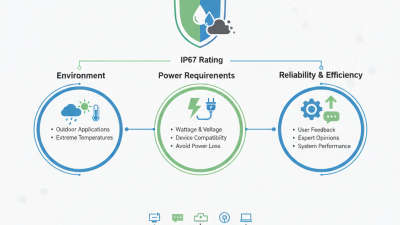
Choosing the right PoE injector starts with the installation site, not the advertised power rating. Measure the cable route, inspect the network cabinet, and note nearby heat sources. A dusty ceiling, outdoor junction box, or crowded rack changes the decision. Check whether the Ethernet cable is shielded, properly terminated, and within the recommended distance. Do not guess. In field installations, voltage drop often appears after expansion, not during the first test.
Match the injector’s output to the powered device’s actual class and peak demand. Leave practical headroom for startup current, cold weather, and future accessories. Confirm input voltage compatibility and grounding requirements before energizing the circuit. For outdoor use, select suitable ingress protection and provide strain relief at every entry point. A small drip can become a long outage. Safety features deserve close inspection, including overcurrent protection, surge resistance, thermal shutdown, and short-circuit protection. These functions reduce damage when cables are pinched or connectors become wet.
Reliability is also about monitoring and maintenance. Look for clear status indicators, stable thermal performance, and documented test procedures. In a busy rack, an injector that runs hot may shorten nearby equipment’s life. Record installation temperature, cable length, and load readings during commissioning. Recheck them after adding devices. I once treated a warm cabinet as harmless because the network stayed online. That assumption was weak. A temporary success does not prove long-term reliability, so allow inspection access and replace damaged cables early.
Compare Management Options, Certifications, and Total Cost
Choosing a PoE injector starts with management, not wattage. Unmanaged models suit a single access point or camera. Managed models provide port status, power limits, remote reboot, and event logs. In a cabinet, these controls can save a truck roll after a frozen device. The IEEE 802.3bt standard allows up to 90 watts from the power-sourcing equipment, while the powered device may receive up to 71.3 watts. That difference matters when cable loss, temperature, and connector quality reduce the usable budget. More power is not automatically better.
Certification should match the installation environment. Check evidence for electrical safety under IEC 62368-1, electromagnetic compatibility testing, and regional conformity requirements. The Ethernet Alliance’s PoE interoperability guidance stresses negotiation and classification, helping prevent unsuitable power delivery. Still, a certificate is not a performance guarantee. I would inspect test scope, revision dates, and operating temperature. Paperwork can look impressive.
Total cost includes more than the purchase price. Add electricity, rack space, replacement time, monitoring software, and support labor. Uptime Institute’s Global Data Center Survey repeatedly identifies power and cooling as major operational concerns, making efficiency a practical budget issue. A basic injector may consume less than a managed unit, but one failed remote site visit can erase that saving. I have also seen teams overbuy four-pair PoE for low-power devices. That choice works, but it deserves a calculation: required device wattage, cable length, ambient temperature, and the cost of downtime.